Your sales team's AI twin.
It hears every call, meeting and chat, and does the follow-through. Perpetual AI keeps a ledger of what was promised on calls, meetings, email and WhatsApp, then does the work: follow-ups, CRM updates, account research and decks. You review and approve.
Android and iPhone, plus the web.
Every surface
Calls, meetings, email and WhatsApp, in one place.
A ledger of every commitment
Who owes what, to whom, by when.
Does the work on its own
Follow-ups, CRM, research and decks. You approve.
Deals aren't lost in meetings. They're lost in the gaps between them.
Capture
Every promise, caught.
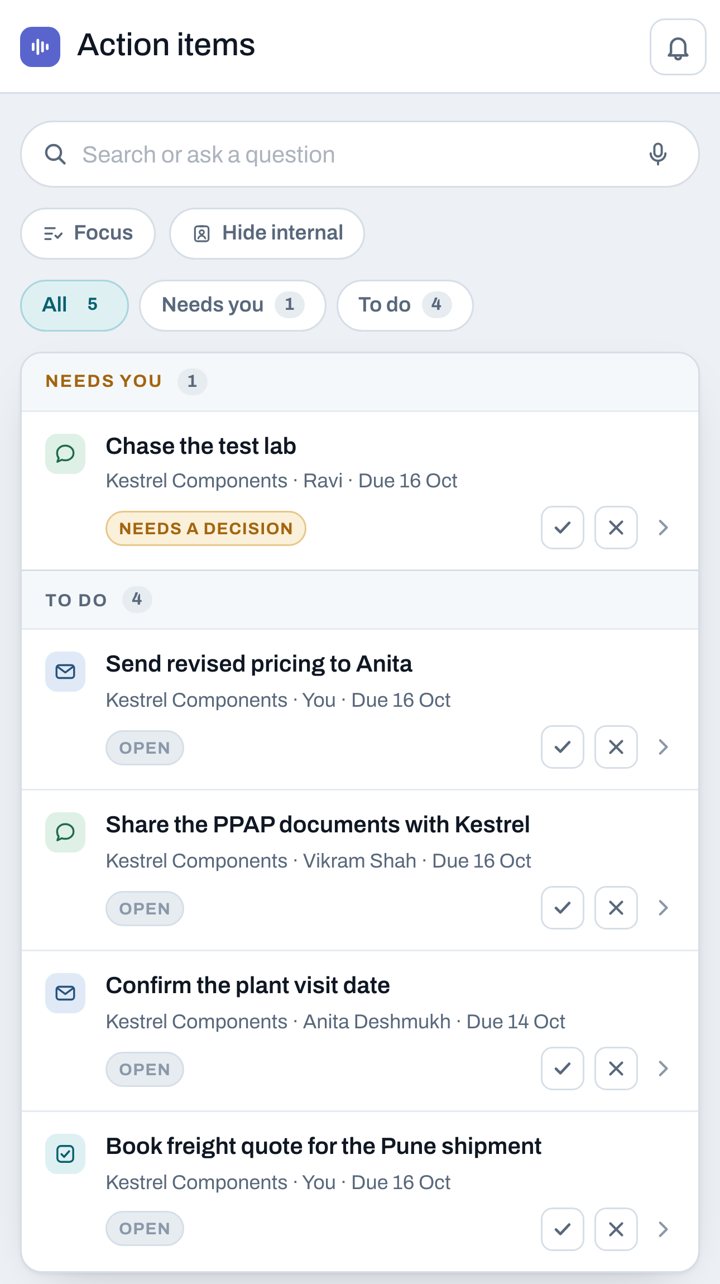
Phone calls, in-person meetings, Zoom, Teams and Meet, email threads and WhatsApp chats. Perpetual AI pulls out each commitment with an owner, a due date and the account it belongs to, and keeps them in one ledger.
- What you promised and what you're owed
- A quick voice debrief for anything that wasn't recorded
- Tells your promises apart from a colleague's
Asks, then acts
It asks only when it has to.
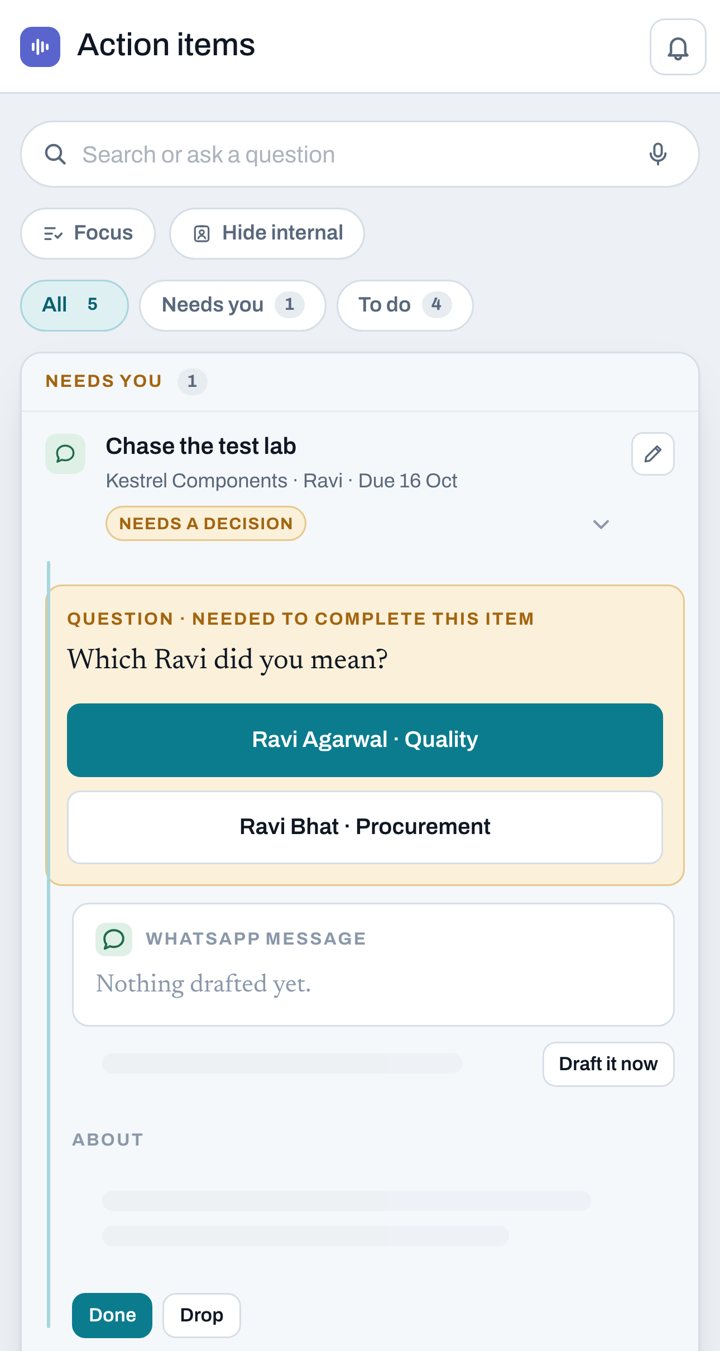
When the twin can't be sure, like which Ravi you meant, it asks one short question with the answers ready to tap. Then it gets on with the work.
- One tap, right from the notification
- Learns your answers, so it asks less over time
Then it does the work.
Other tools record, summarize and stop. Perpetual AI owns the commitment after the meeting ends, and works on it until it's done.
Your apps
Works inside all your apps.
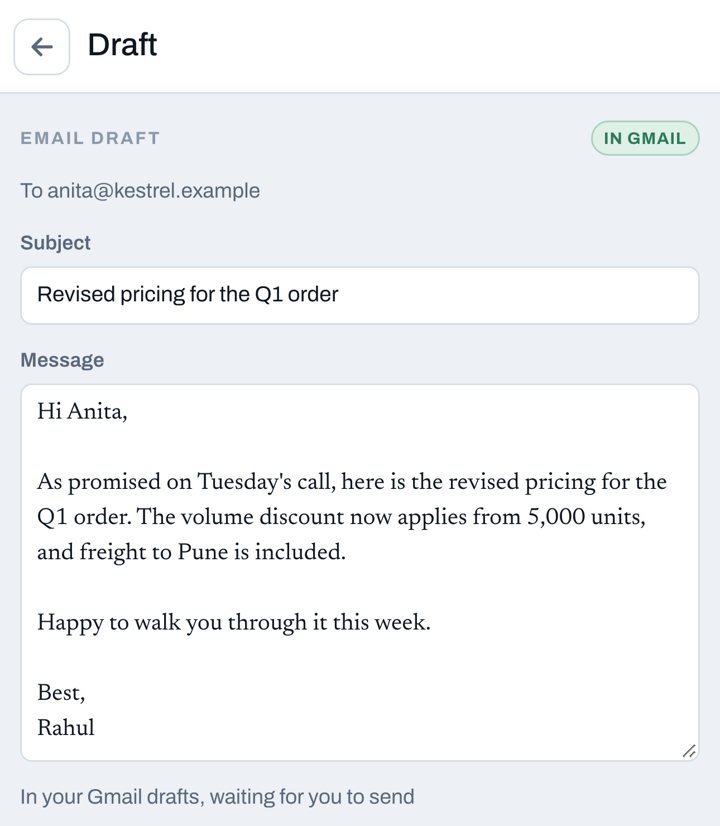
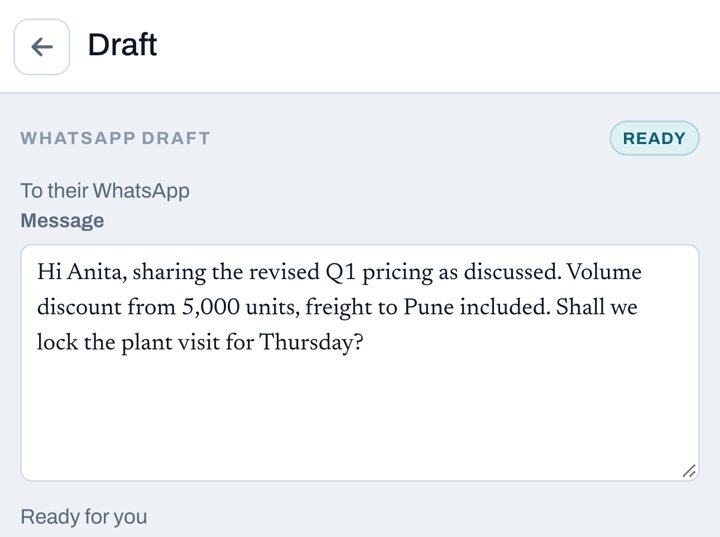
The twin reads your email, WhatsApp and Slack to know where each deal stands, and does the follow-up where it belongs: an email in your Gmail or Outlook drafts, a WhatsApp message ready to send, and soon a Slack note to the colleague who owes the next step. When someone replies, it reads the reply and closes the item.
- Gmail
- Outlook
- SlackComing soon
- Drafts that learn from every edit you make
- Ready at the times you choose, never during quiet hours
- Nothing goes out until you tap Send, with 10 seconds to undo
Slack draft
To Vikram Shah · #kestrel-account
Hi Vikram, Kestrel is waiting on the PPAP documents for 18 Oct. Can you share them by Thursday so they go out with the revised pricing?
Send in Slack
CRM
Your CRM updates itself.
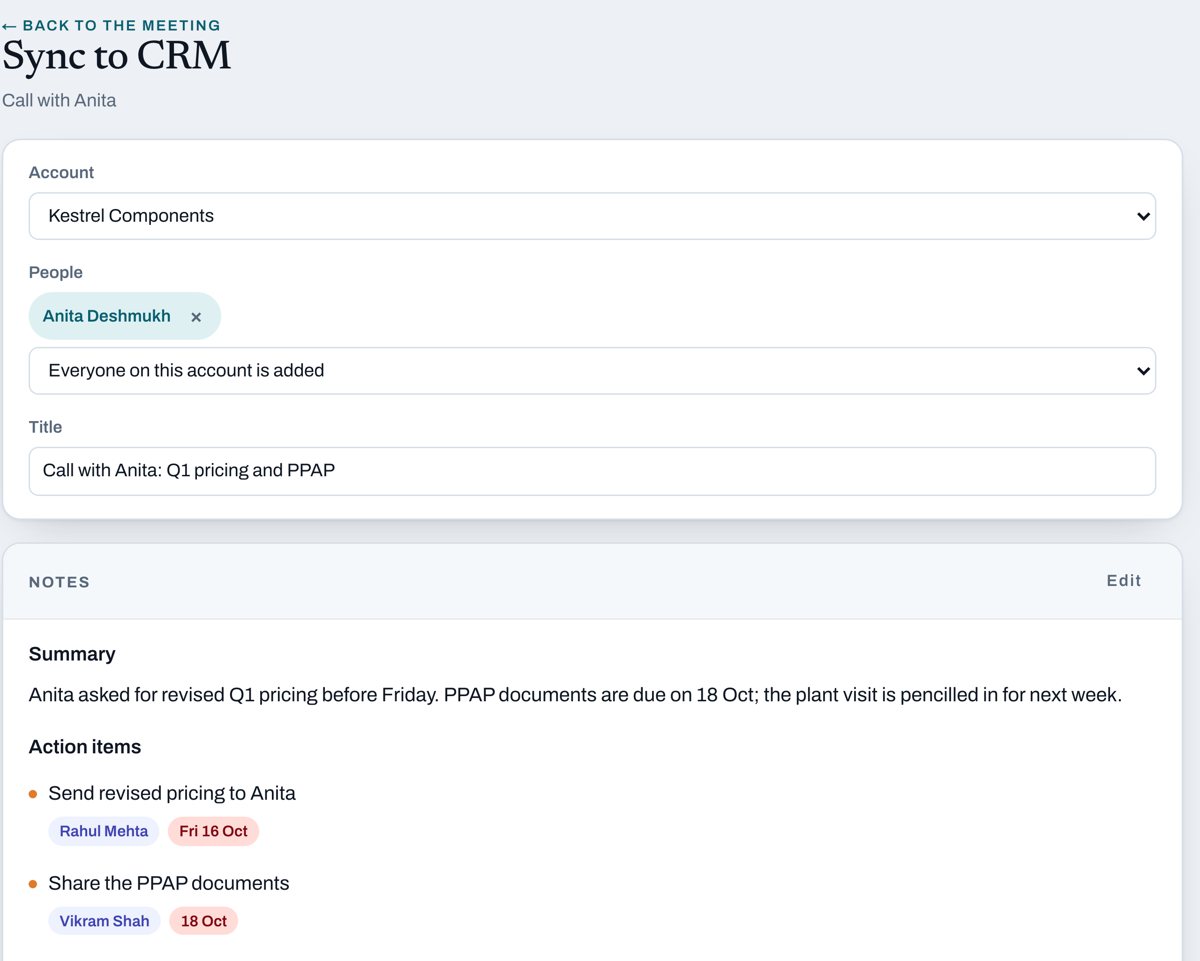
After every call or meeting, the twin writes the CRM entry for you: summary, decisions, next steps with owners and dates, matched to the right account and contacts. When it's confident, it pushes the update on its own. When it isn't, it's one tap.
- Works with Zoho, HubSpot, Salesforce and your in-house CRM
- Finds the account and contacts, or creates them
- No more evenings spent on CRM hygiene
Research and decksComing soon
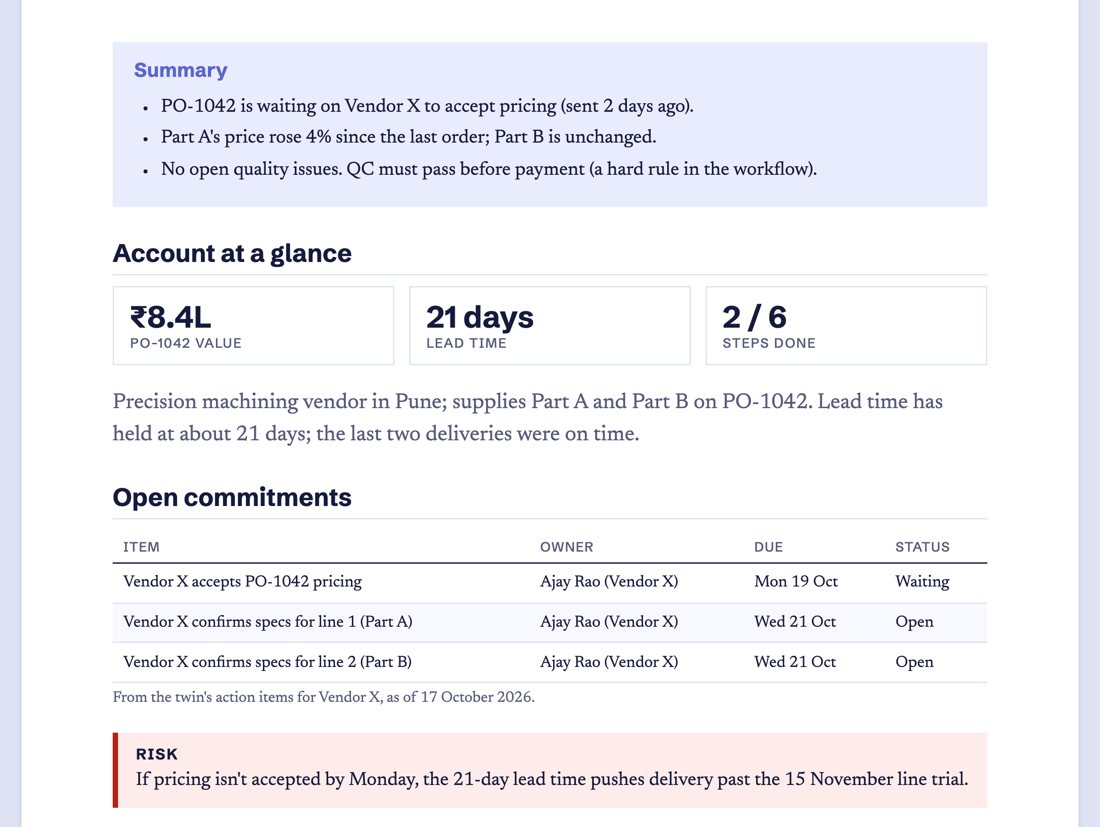
Research and decks, done before you ask.
You don't have to ask for it. When a meeting with an account is coming up, the twin notices, researches the account from your calls, email and CRM, and has the pack waiting: where things stand, open commitments on both sides, risks and pricing history. The deck for the meeting is ready too.
- Starts on its own when a meeting is on your calendar
- Every figure traced to the conversation it came from
Prep
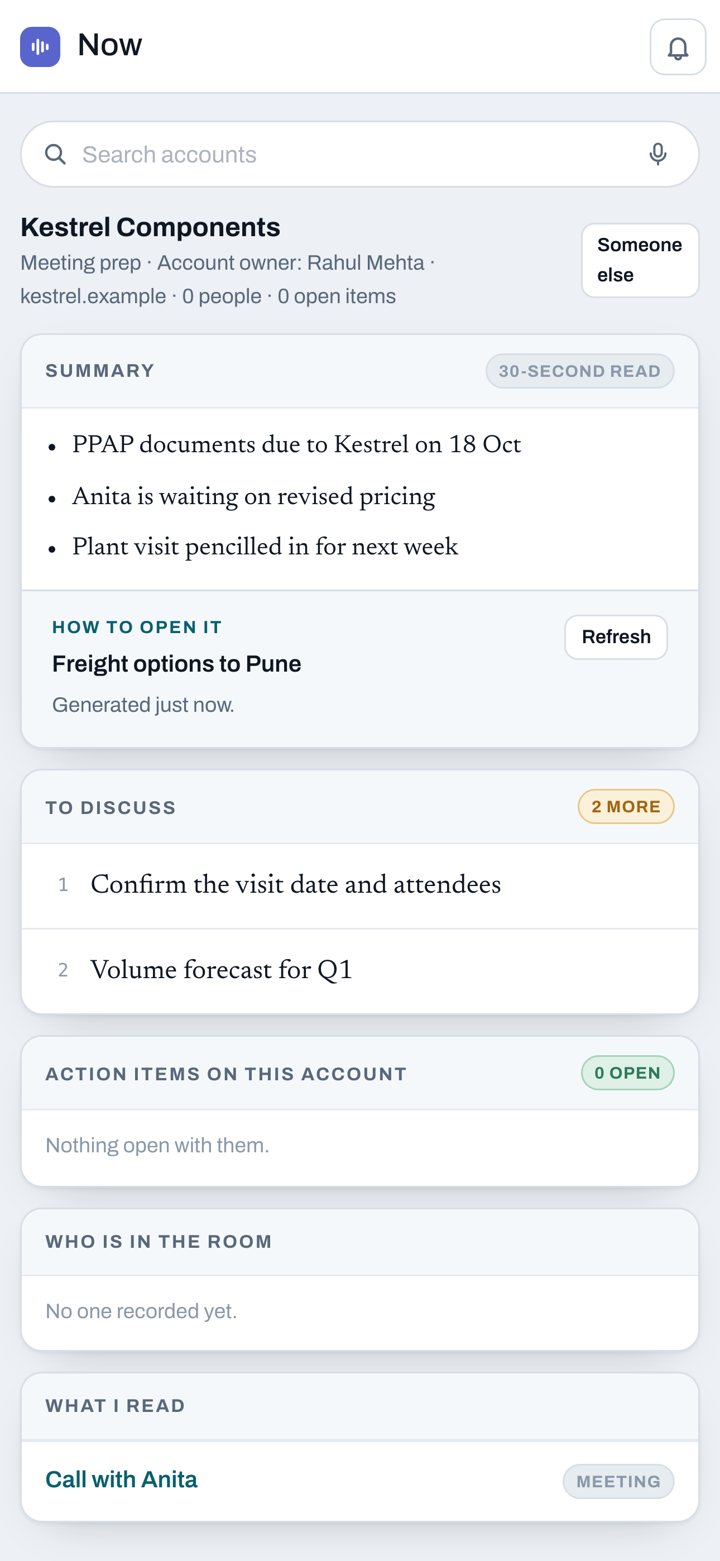
Walk into every meeting prepared.
Get a 30-second read on any account: where things stand, what was promised on both sides, and what to push for, with links to the calls and emails it came from.
- A morning brief with today's top three
- Quiet hours, so it waits until you're working
Memory
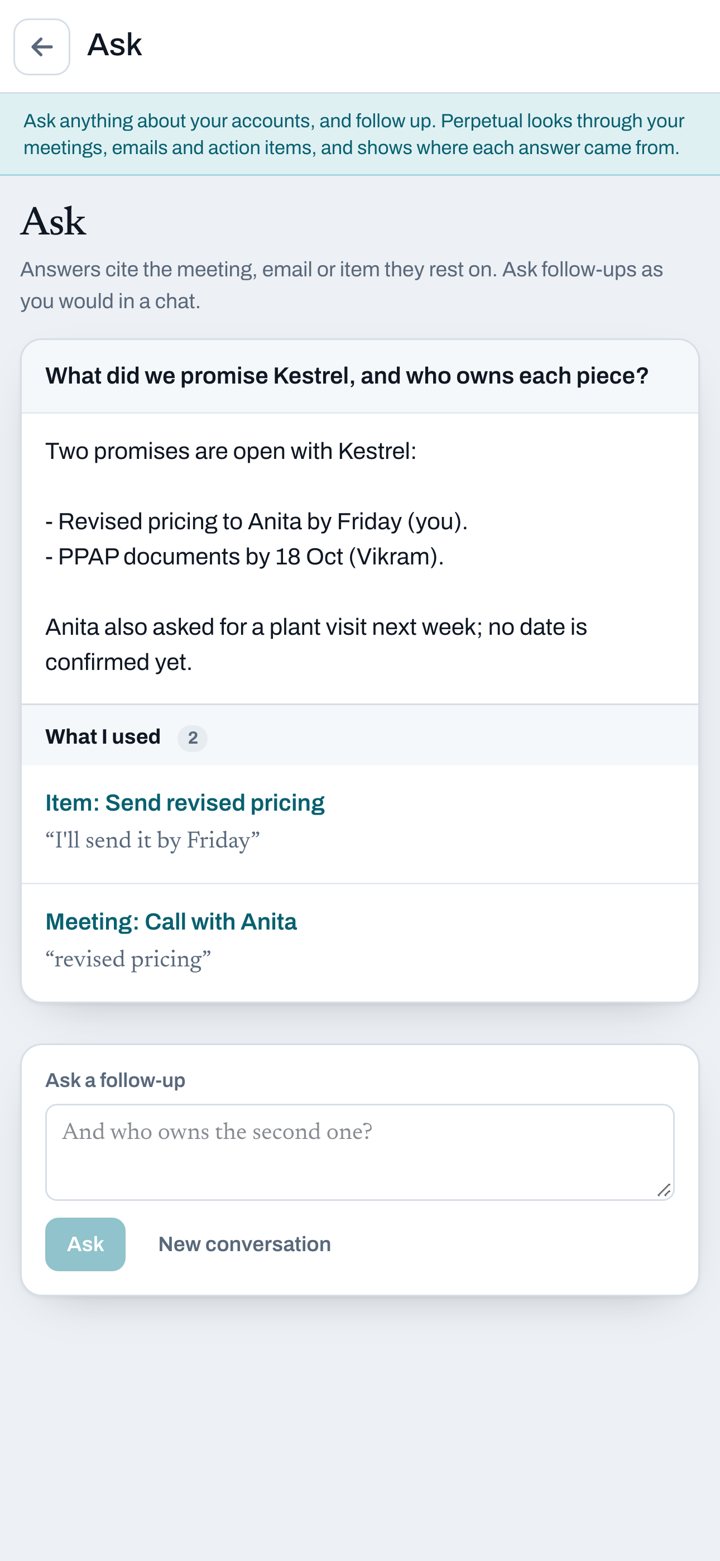
Ask anything about your work.
What did we promise Kestrel? Who's waiting on me this week? What did Anita say about freight? The twin answers from your own calls, meetings, email and action items, and shows exactly where each answer came from.
- Answers cite the meeting, email or item
- Search by voice, in the app or on the web
Screens show sample data.
How it works.
Sign in.
With your phone number, Google or Microsoft account.
Connect what you use.
On Android, point Perpetual AI at the folder your phone saves call recordings in. Add Gmail or Outlook, WhatsApp, your notetaker and your CRM.
Talk as usual.
Make your calls and send your emails. For a meeting in person, record it in the app, or record a short debrief after a call.
Tap to send.
Notes, action items and drafts come to you. Send, edit or drop each one. A sent email, WhatsApp or Slack message can be undone for 10 seconds.
You decide what it uses.
Your phone does the recording. Perpetual AI only works with recordings from contacts you've chosen. Recordings from anyone else aren't uploaded or transcribed.
Nothing is sent without your tap. Drafts wait for you. Perpetual AI never sends an email on its own, and you get 10 seconds to undo one you've sent.
One folder, nothing else. Perpetual AI reads the recordings folder you pick and nothing outside it.
You choose how long audio stays on your phone. Keep uploaded recordings on the phone for 3, 7, 30 or 90 days, or for good.
We don't sell your data. Your recordings, transcripts, emails and contacts aren't sold.
Delete when you like. You can delete your account and everything in it whenever you want. Here's how.
Recording laws are yours to follow. Some places need everyone's consent to record a call. Tell people you're recording and follow the laws where you and they are. Perpetual AI gives you controls. The responsibility stays with you.
Questions.
Does Perpetual AI record my calls?
Not on its own. On Android, your phone's built-in call recorder makes the recording and Perpetual AI turns the ones you choose into notes. Meetings and debriefs you record in the app are recorded by Perpetual AI.
Will call notes work on my phone?
Call notes need an Android phone whose dialer can record calls and save them to a folder you can pick. Call recording isn't available on every phone, carrier or country.
Does it work on iPhone?
Yes, for meetings, debriefs, email and drafts. iPhones don't let apps get call recordings, so after a call you record a short debrief instead.
Does it work with WhatsApp calls?
Not in this version. Perpetual AI works with phone calls your dialer records.
Does it send emails for me?
Only when you tap Send. Email drafts go into your Gmail or Outlook drafts folder, where you can edit them like any other draft.
What does it read in my mailbox?
Business threads, so it can follow up on them and notice replies. You can disconnect Gmail or Outlook at any time.
Does it process calls from people I haven't chosen?
No. Recordings from contacts you haven't chosen aren't uploaded or transcribed. If you turn on unknown numbers, calls from numbers that aren't in your contacts are included.
Are the transcripts accurate?
Not always. Transcription can miss or mishear words, especially names, numbers and noisy lines. Check anything important before you act on it.
Is it legal to record calls?
It depends on where you and the other person are. Some places need everyone's consent, others only yours. You're responsible for following the laws that apply and for telling people when you record. See our Terms and Conditions.
Where can I get the app?
Book a demo and we'll set your team up on Android, iPhone and the web.
How do I delete my data?
Delete your account in the app, or use our deletion page. Recordings saved on your phone stay there until you delete them.
See it on your own deals.
Book a demo. We'll show you the twin working on calls, email and your CRM.